 Anyscene AI
AI Music Video Generator for Your Songs
Every part of your song gets a picture drawn from its lyrics, up to 6 shots can move, and the words stay on screen.
Start from a song
- Write a song firstDescribe it in one line. The AI writes the lyrics for 1 credit, then you make the song and its video.
- Use a song you madeAny song from the AI Music Generator. Its words are timed for 1 credit, then the shots are planned.
- Upload your songMP3, WAV, M4A and more, up to 50 MB and 10 minutes. The lyrics are timed for 1 credit.
Planning the shots costs no credits. You see the price of every picture and clip before anything is made.
One real music video
See the Shot Plan Before You Pay
Harbor Light is a 3:23 song made on Anyscene. The AI music video generator cut it into 20 shots along its lines and sections, and the video above is its first chorus.
- Shot 1, 0:00–0:13, Verse 1
- Shot 2, 0:13–0:23, Verse 1
- Shot 3, 0:23–0:32, Verse 1
- Shot 4, 0:32–0:41, Verse 1
- Shot 5, 0:41–0:49, Chorus, In the video above
- Shot 6, 0:49–1:02, Chorus, In the video above
- Shot 7, 1:02–1:10, Chorus, In the video above
- Shot 8, 1:10–1:17, Chorus
- Shot 9, 1:17–1:25, Verse 2
- Shot 10, 1:25–1:32, Verse 2
- Shot 11, 1:32–1:41, Verse 2
- Shot 12, 1:41–1:54, Chorus
- Shot 13, 1:54–2:06, Chorus
- Shot 14, 2:06–2:19, Chorus
- Shot 15, 2:19–2:29, Bridge
- Shot 16, 2:29–2:40, Bridge
- Shot 17, 2:40–2:49, Chorus
- Shot 18, 2:49–3:01, Chorus
- Shot 19, 3:01–3:15, Chorus
- Shot 20, 3:15–3:23, Chorus

Shot 5 · 0:41–0:49
“So hold on, hold on to the morning Carry me home on a paper wing”
Picture prompt, as the planner wrote it
Cinematic medium close-up of Maya, a young woman in her mid-20s with hazel eyes and wavy brown hair, wearing a cream-colored sweater, holding a delicate folded paper boat in her palms. Warm morning light breaking through, film grain, anamorphic lens flare, shallow depth of field, color grading, movie still quality, no text.
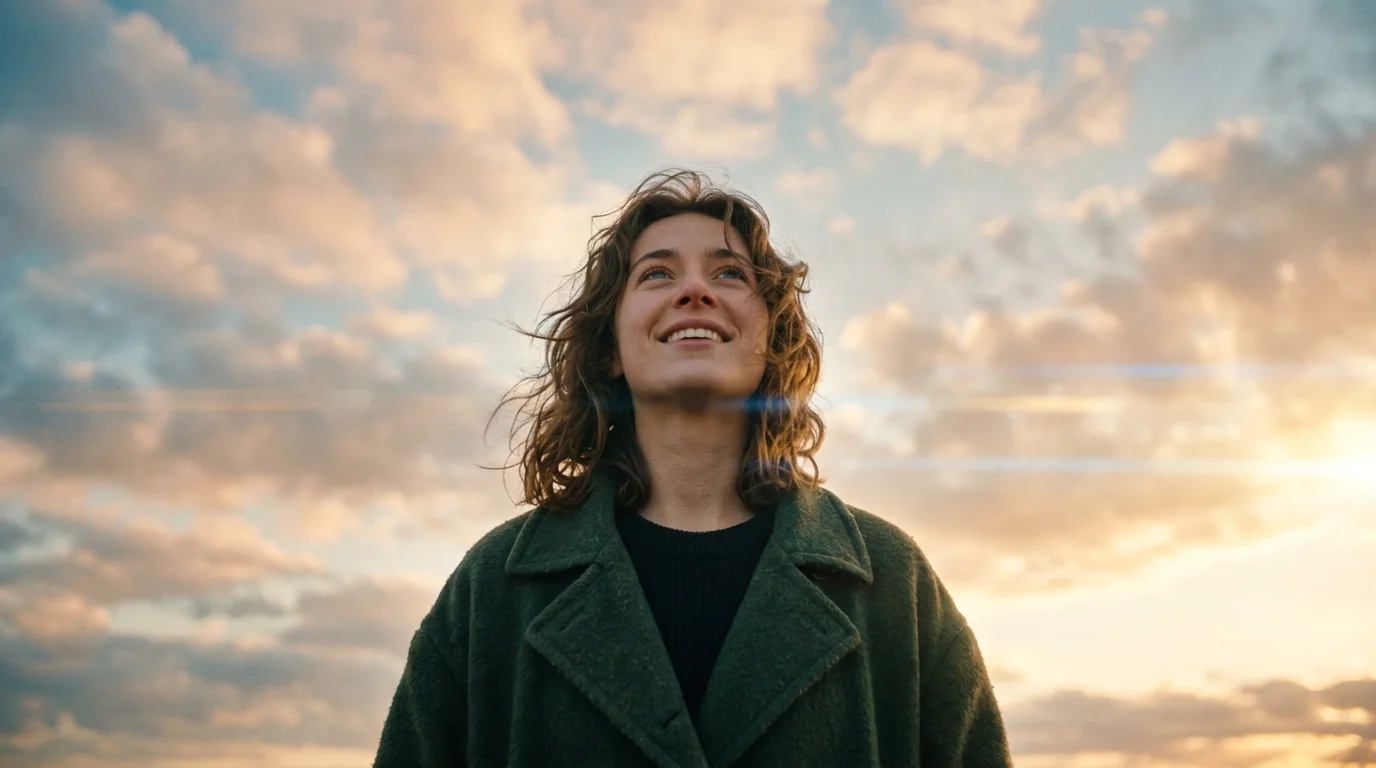
Shot 6 · 0:49–1:02
“Every heartbeat is a warning That the sky is still worth chasing”
Picture prompt, as the planner wrote it
Cinematic low-angle shot of Maya, a young woman with tousled brown hair and an oversized dark green coat, looking upward with a hopeful expression as soft morning clouds drift across a glowing sky. Dramatic lighting, film grain, anamorphic lens flare, shallow depth of field, color grading, movie still quality, no text.
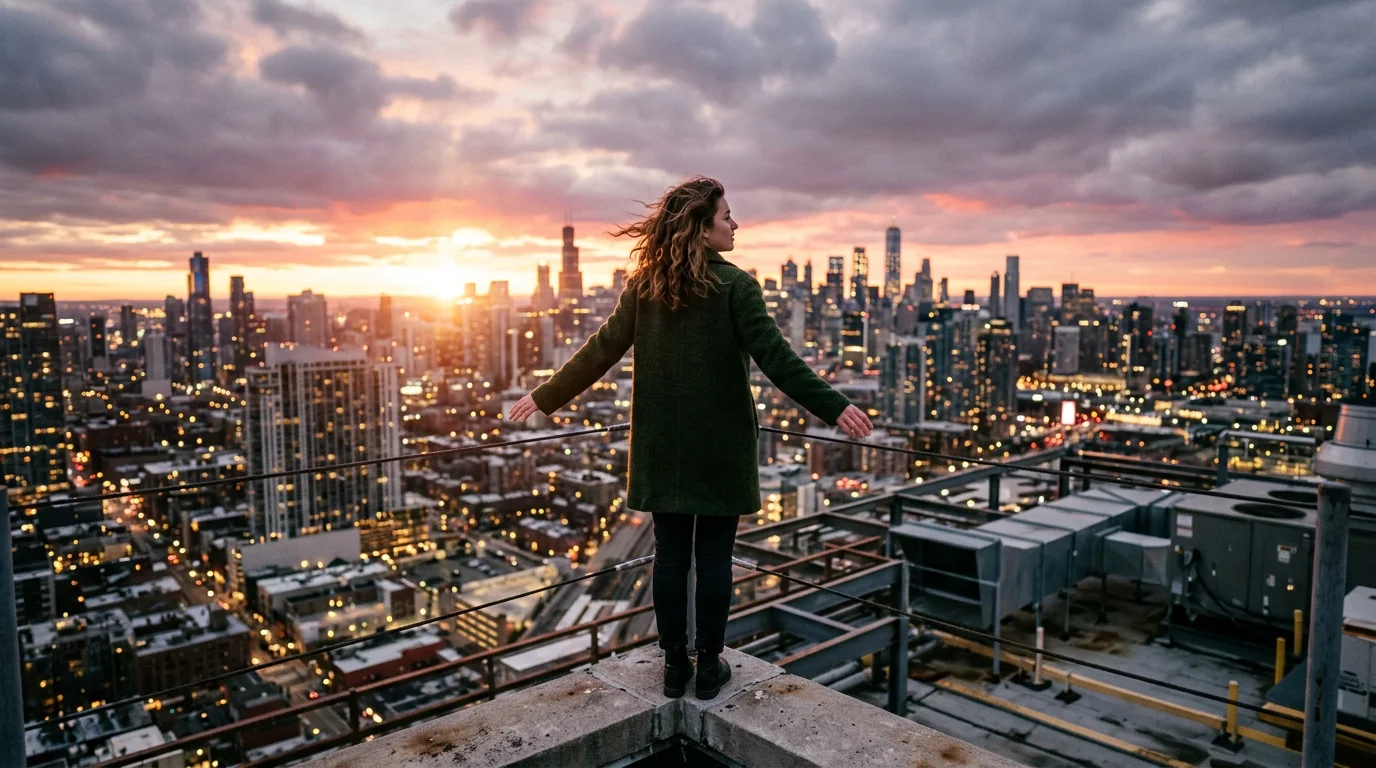
Shot 7 · 1:02–1:10
Moves for its last 5 s“Hold on, hold on to the morning Sing it loud till the rooftops ring”
Picture prompt, as the planner wrote it
Cinematic wide shot of Maya, a young woman in her mid-20s with wavy brown hair, standing atop a city rooftop at dawn wearing a dark green coat, arms slightly open to the wind. Dramatic sunrise lighting, film grain, anamorphic lens flare, shallow depth of field, color grading, movie still quality, no text.
20
shots planned from the lyrics, at no charge
24
credits for the chorus pictures: 3 × 8
40
credits for the moving shot: Kling 2.6, 5 s
0
credits to export the video
Shots 5 and 6 are pictures with a slow camera move. Shot 7 holds its picture, then its clip plays to the end of the shot.
Definition
What Is an AI Music Video Generator?
An AI music video generator turns a song into a video. It cuts the song into shots along its lyrics and timing, draws a picture for each shot, and plays them in time with the music, with the words on screen.
Shots that follow the song
Cuts land on the beat where lines start, and a new section starts a new shot. Intros and instrumental breaks get shots of their own.
A price before anything is made
Planning costs nothing. Every picture and clip shows its price, and the total is what you are charged.
One video with the lyrics
The pictures, the moving shots, your song and its timed words come out as one MP4.
Pricing
What an AI Music Video Costs
Planning and exporting cost nothing. You pay once per song to time the words, then for each picture and clip, at the price shown first.
The whole song
A picture for every shot, from the first line to the last. Harbor Light (3:23) has 20 shots.
- Timing the words
- 1 credit
- Nano Banana 2 picture, 1K
- 8 credits each
- 20 pictures
- 160 credits
- Export
- 0 credits
Harbor Light, every shot
161 credits
Best for a finished song you want to post in full.
One chorus
Make only the shots you need, one by one on the shots page. A chorus is usually three or four shots.
- Timing the words
- 1 credit
- 3 pictures
- 24 credits
- Export
- 0 credits
The chorus above, as pictures
25 credits
Best for a teaser, a Short or a first look at the style.
Moving shots
Up to 6 shots can move. A clip starts from the shot's picture and plays at the end of the shot.
- Kling 2.6, 1080p, 5 s
- 40 credits
- Seedance 2.0 Mini, 480p, 4 s
- 24 credits
- Shots that can move
- 6
Harbor Light, 6 shots moving
401 credits
Best for the moments people should remember, like the first chorus or the last line.
Timing the words needs a paid plan or a credit pack. Prices here are for Nano Banana 2 at 1K; the editor also offers lower-cost picture models and shows their prices.
One singer
Keep Your Singer the Same in Every Shot
A music video falls apart if the singer's face changes from shot to shot. Two things keep Maya the same.
One description, every prompt
The planner describes each recurring character once, in detail, and writes that look into every picture prompt the character is in. This is how it described Maya:
A young woman in her mid-20s with thoughtful hazel eyes, tousled shoulder-length wavy brown hair, a slender build, wearing an oversized vintage dark green wool coat over a soft cream-colored sweater.
A saved character's portrait
Save a character in Assets, then bind it to the singer on the shots page. Its portrait goes along with every shot it is in.
Open AssetsDetails can still change between shots: Maya wears the sweater in shot 5 and the coat in shots 6 and 7. If it matters, edit that shot's prompt and make the picture again.
Suno songs
Made for Suno Songs
Songs on Anyscene are made with Suno V6, which makes them the easiest songs to give an AI music video generator.
Timing from the song itself
Suno times every word of the song it sang. Nothing is transcribed, so there are no misheard words to fix.
Sections become shots
[Verse], [Chorus] and [Bridge] tags start new shots, so the video changes when the song does.
A Suno song from elsewhere
Made it on Suno itself? Upload it. The vocal is transcribed with a time on every word, and pasting the lyrics keeps the exact wording.
How it works
How to Make an AI Music Video in 4 Steps
From a song to a finished MP4 with the AI music video generator, each step waiting for your click.
- 1
Pick or make a song
Write one from a single line, choose a song you made, or upload your own.
- 2
Time the lyrics
Every word gets its time in the song, for 1 credit. Fix any line on the timeline if you need to.
- 3
Plan the shots
Choose a look and a picture model, then plan. Edit any picture prompt or bind a saved character before you pay.
- 4
Make it and export
Make the pictures, pick up to 6 shots to move, then export in 16:9, 9:16 or 1:1. The export costs no credits.
The pictures are made at the same time, about 54 seconds each in the example above. Its clip took 5 minutes.
Which kind
Lyric Video, Storyboard or Moving Music Video?
Three kinds of music video from the same song, in the same editor.
| Lyric video | Storyboard music video | Moving music video | |
|---|---|---|---|
| On screen | The lyrics over a cover, a colour, or your own picture or video | A picture for each part of the song, with the lyrics on top | The storyboard, with up to 6 shots that move |
| Made from | Your song and its timed words | Pictures drawn from the lyrics | Pictures, then clips made from them |
| Harbor Light (3:23) | 1 credit | 161 credits | Up to 401 credits |
| Export | 0 credits | 0 credits | 0 credits |
| Best for | Lyric uploads and karaoke | Releases and full-song videos | Teasers and the moments that matter |
Start with any of them: a lyric video can become a storyboard later, and a storyboard can gain moving shots.
AI Music Video Generator FAQ
Songs, shots, prices and formats.
Yes. Upload an MP3, WAV, M4A, AAC, FLAC or OGG file up to 50 MB and 10 minutes, and confirm you have the right to use it. Its lyrics are timed for 1 credit.
It cuts the song where lines start, about every 6 to 10 seconds, and starts a new shot when the section changes. Each cut is then moved onto the nearest beat, and you can drag any cut in the editor. Intros and instrumental breaks get shots of their own, up to 40 shots a song.
Timing the words costs 1 credit a song and each Nano Banana 2 picture 8 credits, so Harbor Light (3:23, 20 shots) costs 161 credits. A moving shot costs 40 credits with Kling 2.6, and planning and exporting cost nothing.
Mostly. The planner writes the singer's look into every picture prompt, and a saved character you bind sends its portrait along. Small details, such as clothing, can still change.
Pick up to 6 shots. Each gets the model's shortest clip, 5 s with Kling 2.6 or 4 s with Seedance 2.0 Mini, which plays at the end of the shot after its picture holds. You can switch a shot back to its picture at any time.
The pictures are made at the same time, about 54 seconds each in the example above, and its clip took 5 minutes. The export runs in your browser and takes longer for longer songs.
MP4 at 30 frames per second, in 16:9, 9:16 or 1:1, at 1080p or 4K. 4K is for songs up to 5 minutes.
Yes. Songs made here come with Suno's own word timing. A Suno song you made elsewhere can be uploaded if you have the right to use it.
Make a Music Video for Your Song
Plan the shots, see every price, and export with no credits for the export.