 Anyscene AI
Image to Image AI
Upload a picture and say what it should become: a new style, a new scene, new light, or several pictures combined into one. The price is on the button before you press it.
Try an example
Seven real results
Image to Image AI, Before and After
Seven image to image results from our model pages. Under each one: the reference it started from, the model, and the prompt as it was sent, with what it asked to keep and what it asked to change marked.
- Keep
- Change


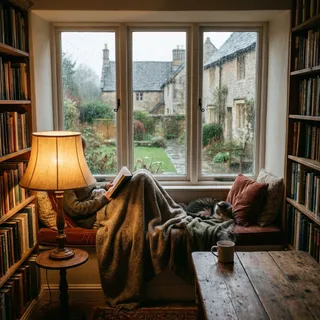 The same room at nightGPT Image 2.5
The same room at night: the lamp is the only light, snow falls outside instead of rain, keep everything else the same

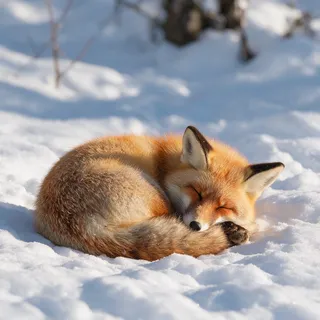 Dusk under a pink skySeedream 5.0 Pro
The same fox at dusk under a pink sky, keep the fox exactly the same
 As a woodblock printQwen Image 3.0
Redraw this as a Japanese ukiyo-e woodblock print with bold outlines and flat colors

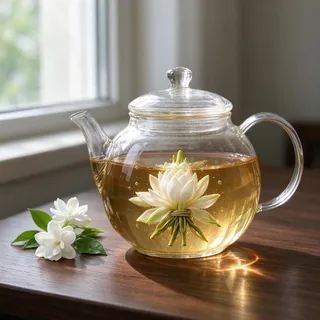 A clean product shotSeedream 5.0 Flash
Turn this into a clean product shot of the same glass teapot on a pure white background
 A dog instead of the catNano Banana 2 Lite
Replace the cat with a sleeping golden retriever, keep everything else the same

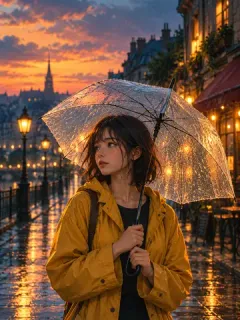
One image to image run each, nothing re-rolled or retouched. "Use this prompt" puts the reference and the prompt into the generator above.
The short version
What Is Image to Image AI?
AI image to image makes a new picture from one you already have, steered by a sentence.
Image to image AI is software that takes a reference picture and a written instruction and returns a new picture. The model reads both: the reference supplies what is there, from the subject and the layout to the light and colors, and the words say what to keep, what to change and how the result should look.
ReferenceYour words
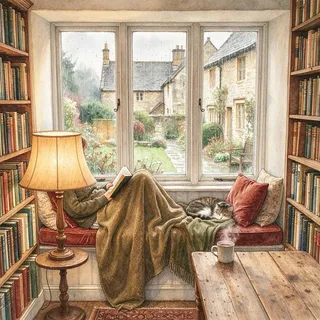
Keep the layout of this room and redraw it as a soft watercolor illustration
 New picture
What the reference brings
- The subject: a face, a product, a pet
- The layout: where things sit in the frame
- The light, colors and materials, unless you change them
- The shape of the picture, which the result follows
What your words decide
- What changes: the style, the setting, the time of day
- What must stay, said out loud: "keep her face the same"
- What is new: an object added, a background replaced
- How far to go: the more you name, the more changes
The models here have no strength slider. How much of the reference survives an image to image run is decided by the prompt, as the next section shows.
One photo, four prompts
How Much of the Reference Stays? One Photo, Four Prompts
Older image to image tools had a strength slider. The models here don't: you set how much survives with words. We gave Seedream 5.0 Flash, the default, one photo of a reading nook and four prompts, each asking it to keep less.
- Keep
- Change
 Reference
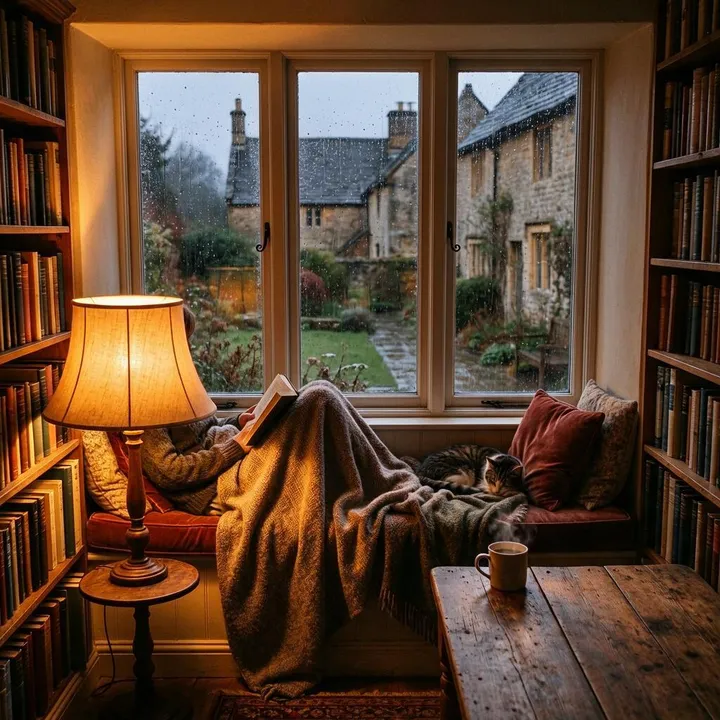 1 / 4
1 / 41. Change only the light
Keep this room exactly as it is and change only the light: warm lamplight on a winter evening
What stayed: Everything. The lamp glows warmer, but the window still shows a rainy afternoon: "winter evening" reached the lamp, not the sky.
 2 / 4
2 / 42. Same objects, new place
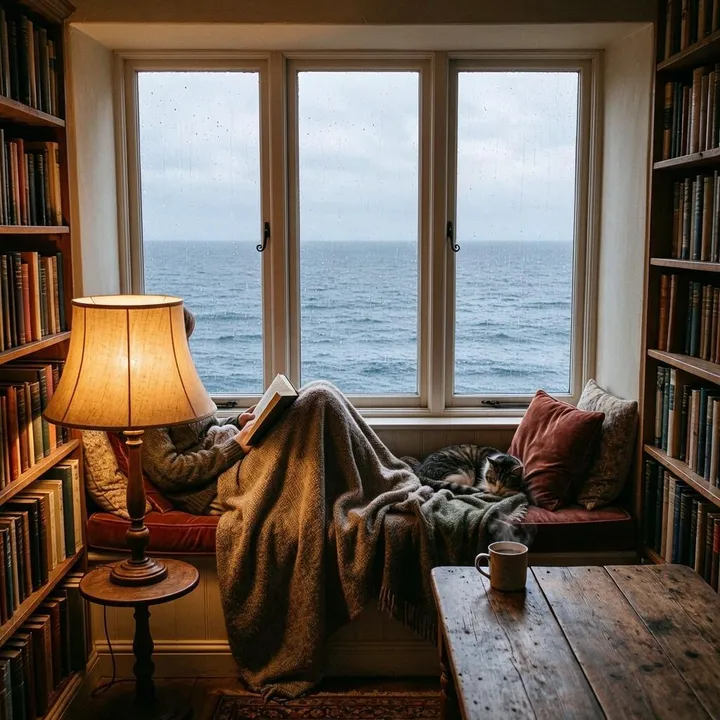
The same window seat, cushions and cat, now in a beach house with the sea outside the window
What stayed: The whole room. Only the view changed, from a village to the open sea; the beach house never arrived.
 3 / 4
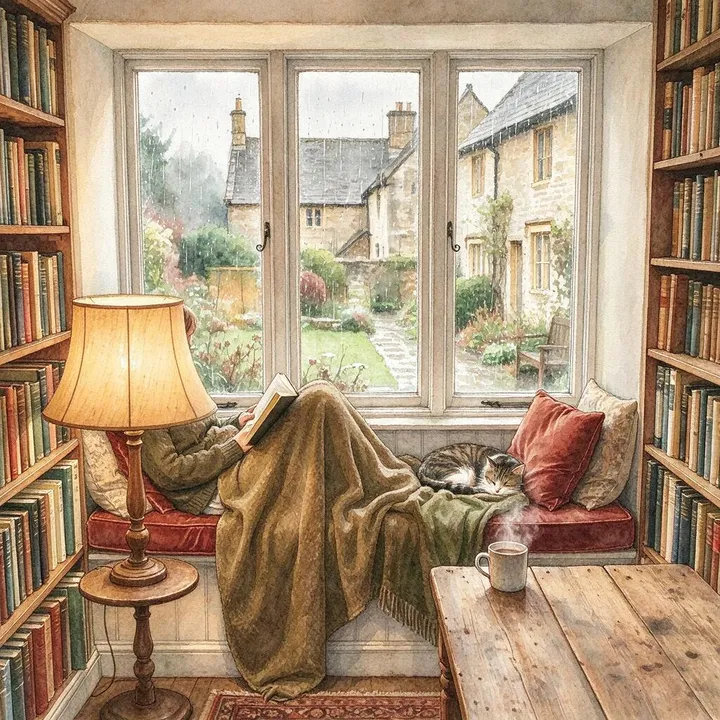
3 / 43. Same layout, new style
Keep the layout of this room and redraw it as a soft watercolor illustration
What stayed: The layout and every object. The watercolor is light, more a soft painted finish than a new medium.
 4 / 4
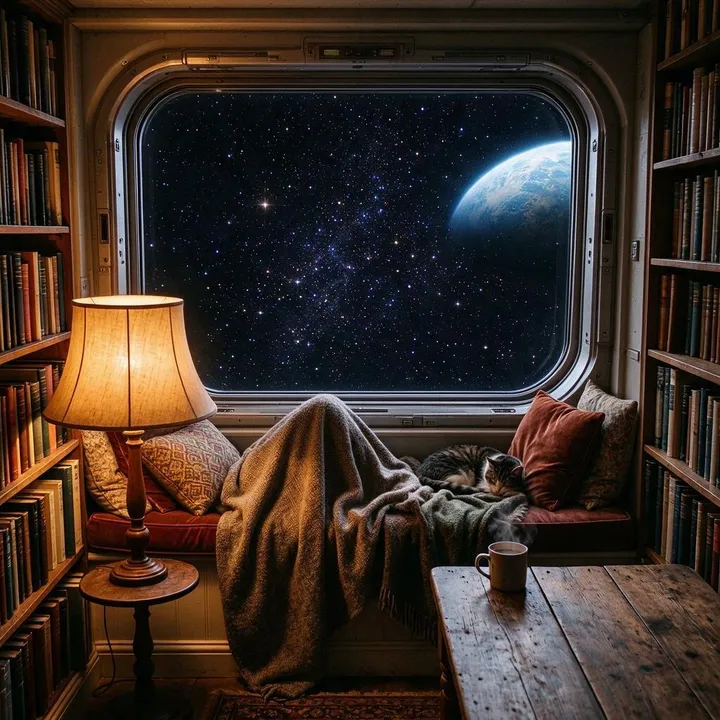
4 / 44. Only the idea
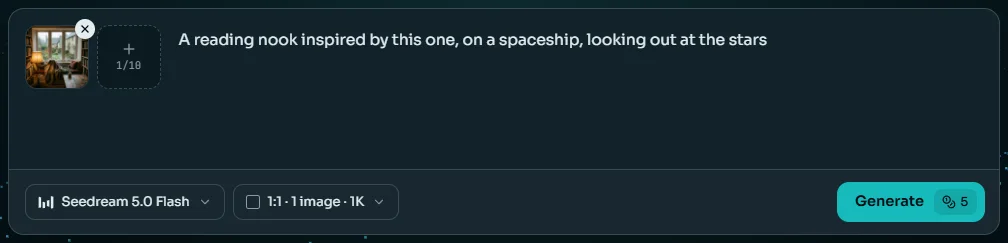
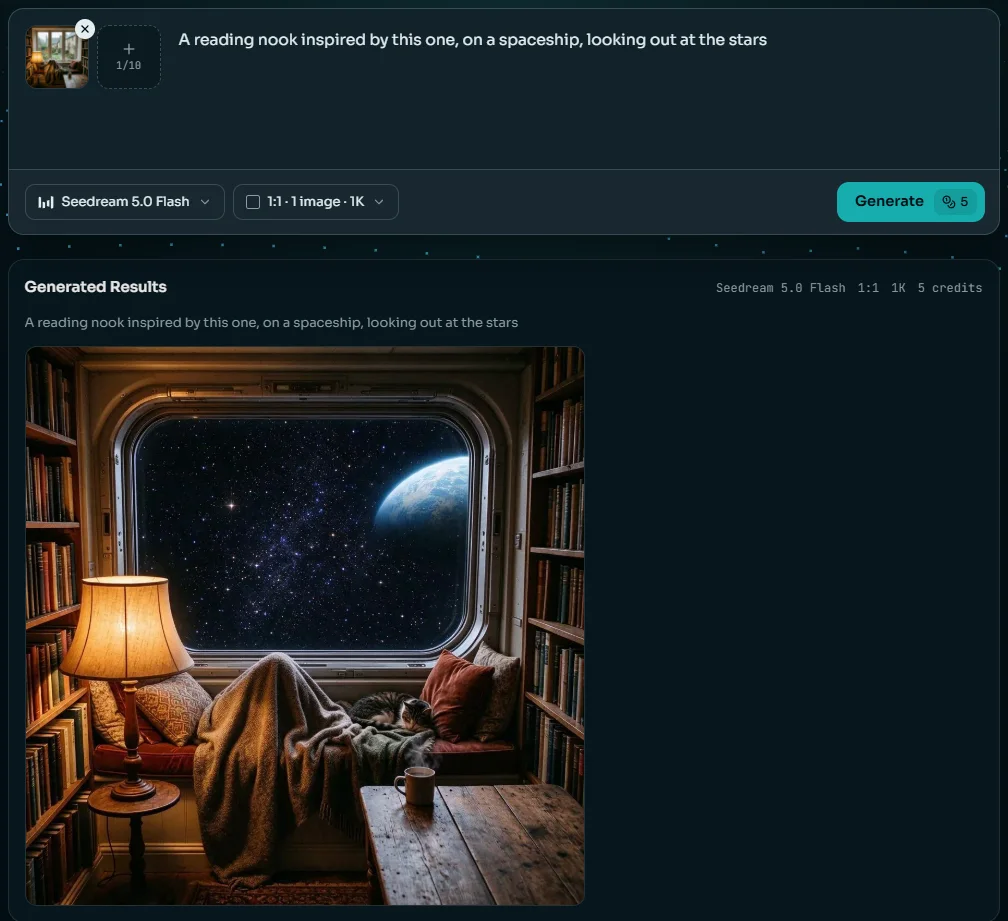
A reading nook inspired by this one, on a spaceship, looking out at the stars
What stayed: Still the room: the shelves, lamp, blanket and cat all came back. Only the window became a porthole onto stars and a planet.
What this tells you
- Seedream 5.0 Flash holds on to a reference hard. Even "inspired by this one" kept the room and changed only the window.
- It changes what you name and keeps what you don't. To lose the shelves, say so: "no bookshelves, a curved white wall instead".
- A style asked for plainly can still change a lot: in the results above, Qwen Image 3.0 redrew the fox photo as a woodblock print.
- For a picture that only borrows an idea, start from words on the text to image page instead.
Seedream 5.0 Flash at 1:1, one image to image run per prompt on 23 October 2026, 14 to 19 seconds each.
Writing the prompt
How to Write an Image to Image Prompt
A good image to image prompt answers three questions: what changes, what stays, and how the result should look.
One prompt, taken apart
Replace the background with a quiet beach at sunriseWhat changeskeep her face, hair and jacket exactly the sameWhat stayssoft natural light, a real photographHow it looks
Vague
“Make it better”
The model has to guess what to change and what to keep, so it changes a little of everything.
Clear
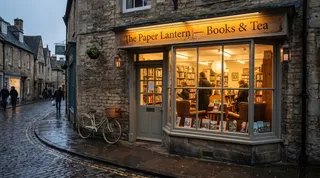
“Make it a snowy winter evening, keep the shop exactly the same”
One change and one thing to hold on to. This is the prompt behind the snowy bookshop above.
One change at a time
Ask for the light, then the background, then the outfit. Several changes in one image to image prompt drift further from the reference.
Say what must not move
Name it: the face, the logo, the product's shape. Models keep more of what they are told to keep.
Refer to images by order
With several references, write "the teapot from the first image" and "the room in the second image".
Mind the shape
The result follows the reference's shape. Pick another ratio first if you need a banner or a story.
Several references
Combine Several Images into One
Most of the models here take more than one reference in a single image to image request. Number them in the prompt and say which part of each to use.
12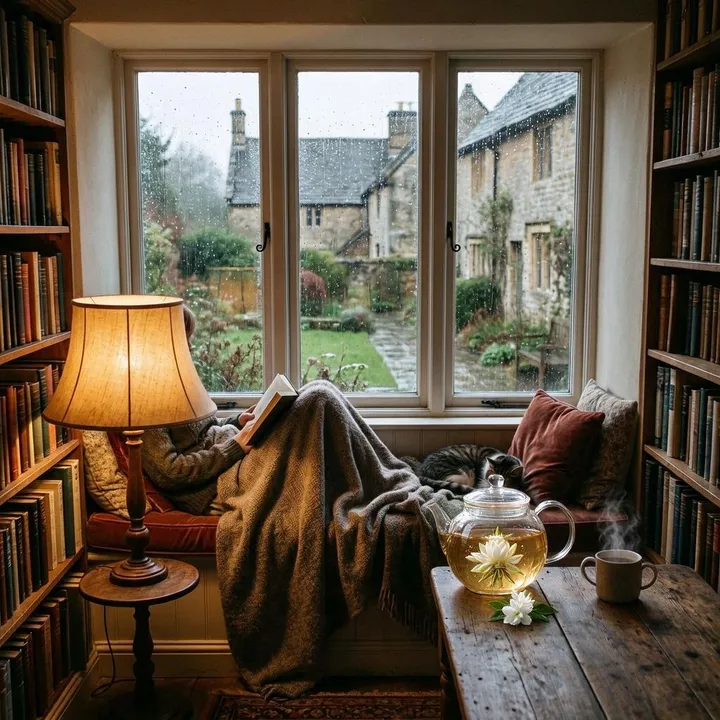
The prompt, as sent
Put the glass teapot from the first image on the wooden table of the room in the second image, in the same soft daylight
- From the references
- What to do
- The teapot kept its glass, tea and flower; the room kept its lamp, blanket and cat. The model sized the teapot to the table by itself.
- Say which picture sets the scene. Here the second image is the room, so the result keeps its layout and light.
- Two or three references are easier to steer than ten: each extra one is something more the model can borrow from.
How many references one request takes
Seedream 5.0 Flash, one image to image run on 23 October 2026, 20 seconds.
Every model, priced
Which Image to Image Model to Pick
Every model below takes a reference picture. They differ in what they do best, how many references one request can carry, what they charge and how large a picture they return. The numbers come from the price list the Generate button uses.
Swipe the table sideways to see every column.
| Model | Best for | References | Credits per image | Largest size | Available on |
|---|---|---|---|---|---|
| Basic | Quick drafts from a reference | up to 5 | 2 credits | 1K | All accounts |
| Seedream 5.0 Flash | Restyles and new scenes at a low price; the default on this page | up to 10 | 5 credits | 2K | All accounts |
| GPT Image 1.5 | Following long instructions about one reference | up to 1 | 6 credits | 1K | Any plan or credit pack |
| Nano Banana | Keeping a subject the same across edits | up to 1 | 6 credits | 1K | Any plan or credit pack |
| Nano Banana 2 Lite | Small changes that keep the reference close, at a low price | up to 10 | 6 credits | 1K | All accounts |
| Wan 2.7 Image | Everyday results from several references, with a Pro tier for more detail | up to 9 | 6–20 credits | 4K | Any plan or credit pack |
| Flux 2 | Product and photo detail from several references | up to 8 | 8–36 credits | 2K | Any plan or credit pack |
| GPT Image 2 | Layouts and text changed on one reference | up to 1 | 8–22 credits | 4K | Any plan or credit pack |
| Nano Banana 2 | Sharp results up to 4K from one reference | up to 1 | 8–22 credits | 4K | Any plan or credit pack |
| Qwen Image 3.0 | Strong restyles, like the woodblock fox above | up to 3 | 8 credits | 2K | Any plan or credit pack |
| GPT Image 2.5 | The most references, and exact wording in the result | up to 16 | 10–26 credits | 4K | Any plan or credit pack |
| Seedream 5 Lite | Large pictures from many references, up to 3K | up to 14 | 10–14 credits | 3K | Any plan or credit pack |
| Seedream 5.0 Pro | Keeping a subject while the light and setting change | up to 10 | 11–22 credits | 2K | Any plan or credit pack |
| Nano Banana Pro | The hardest combinations | up to 8 | 29–38 credits | 4K | Any plan or credit pack |
16 image to image models in all. Each model's page shows its own runs.
How to Use Image to Image AI in 3 Steps
From a reference to a new picture, image to image takes three steps and, on the default model, under half a minute of waiting.
Step 1: Add your reference
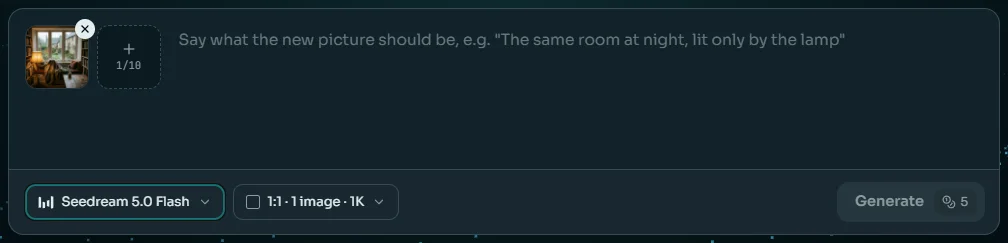
Drop a JPG, PNG or WebP into the reference slot of the image to image generator at the top of this page. Most models take more than one: add them in the order you'll refer to them in the prompt.
Step 2: Say what it should become
Write what changes, what stays and how it should look. Seedream 5.0 Flash is selected to start; switch models from the first chip. The result matches your reference's shape as closely as the model allows.
Step 3: Generate and compare
Press Generate. The new picture appears under the box with the prompt that made it. Change one thing in the prompt and run it again, or take the result on to the editor, the upscaler or a video.
What people use it for
What People Use Image to Image AI For
Six jobs where image to image, starting from a picture, beats starting from words.
Restyle a photo
Turn a photo into a watercolor, an anime frame or a woodblock print while the subject stays recognizable.
Change the light or season
The same street at night, in snow or at golden hour, without a reshoot.
Clean product shots
A product photographed on a cluttered table, returned as a studio shot on a plain background.
Product photo tools →New outfits
Keep the person and change the clothes. Our clothes changer is image to image built for exactly that.
AI Clothes Changer →Combine references
Put a product into a room, or a person into a scene, from separate pictures.
Sketch to picture
Upload a rough drawing and describe the finished picture. The layout comes from your sketch.
Three ways to make a picture
Image to Image, Image Editing or Text to Image?
Image to image, editing and text to image all run on the same models. Which one fits depends on what you start from and how much should change.
| Image to image | AI image editor | Text to image | |
|---|---|---|---|
| You start with | A reference picture and a sentence | Your photo and one instruction | Words only |
| How much changes | As much as you ask: a style, a scene, a new picture | One thing; the rest stays | Everything is new |
| Best for | Restyles, new settings and combining pictures | Fixing a real photo: background, outfit, text or light | New ideas from scratch |
| Several pictures at once | Yes, up to 16 references | Yes; the first is the one edited | No |
| Where on Anyscene | This page | The AI Image Editor page | The Text to Image page |
The generator is the same on all three pages; each page starts it the way its job needs.
Honest limits
Where Image to Image Still Slips
Image to image AI redraws the whole picture to make the new one, and that has costs. Six to know about.
It holds on too hard
Some models keep more of the reference than you asked; in our test even "inspired by this one" kept the room. Name what should go.
Faces come back close
Image to image redraws the whole picture, so a face can shift a little even when you ask to keep it. Check it at full size.
Text in the reference
Signs and labels in a reference can come back misspelled. Quote the words you need in the prompt.
Too many references
Each extra reference is something more the model can borrow from. Two or three are easier to steer than ten.
The shape is the reference's
The result follows the reference's shape. For another one, pick a ratio first or extend the result afterwards.
AI Image Extender →Other people's pictures
Only use references you have the right to use. Changing someone else's photo or artwork doesn't make it yours.
One Balance for Every Image to Image Model
A picture costs 2 to 38 credits depending on the model and size, 5 on the default. Plans begin at $15.9 a month billed yearly, and credit packs top up any plan.
Yearly prices, shown per month. Monthly billing and credit packs are on the pricing page.
Image to Image AI FAQ
Image to image AI makes a new picture from a reference picture and a written instruction. The reference supplies the subject, the layout and the look; your words say what to keep and what to change.
Text to image starts from words only, so every picture is new. Image to image starts from a picture, so the result keeps whatever you don't ask to change. Use text to image for new ideas and image to image when a picture already has what you want.
No. The models here have no strength slider. You control how much of the reference survives with words: name what to keep and what to change. On Seedream 5.0 Flash the reference wins unless you say otherwise.
Start with Seedream 5.0 Flash, the default, at 5 credits. Use Nano Banana 2 Lite for small changes that keep the photo close, GPT Image 2.5 when you need up to 16 references or exact wording, and Qwen Image 3.0 for strong restyles.
It depends on the model: one on Nano Banana, Nano Banana 2, GPT Image 1.5 and GPT Image 2, three on Qwen Image 3.0, ten on Seedream 5.0 Flash, Seedream 5.0 Pro and Nano Banana 2 Lite, and up to 16 on GPT Image 2.5. Refer to them by their order in the prompt.
From 2 credits on Basic to 38 on Nano Banana Pro at 4K; the default model costs 5. The price is on the Generate button before you press it, and a picture that fails gives its credits back. A new account starts with 40 credits for the three image to image models open to free accounts: Basic, Seedream 5.0 Flash and Nano Banana 2 Lite.
Yes, as long as you have the rights to the reference you upload. Everything you make on Anyscene can be used commercially, but changing someone else's photo or artwork doesn't make it yours.
Close, not pixel for pixel: the whole picture is redrawn. Say what must stay, such as "keep her face and hair exactly the same", and check the result at full size before you use it.
JPG, PNG and WebP pictures up to 30 MB each. Results stay in your history for 30 days, so download the ones you want to keep.
Related AI Image Tools
Same credits, the next thing you may want to do with a picture.
Start from a Picture You Already Have
Sign in, add a reference and say what it should become. The default model makes a picture for 5 credits, and failed pictures are refunded.