
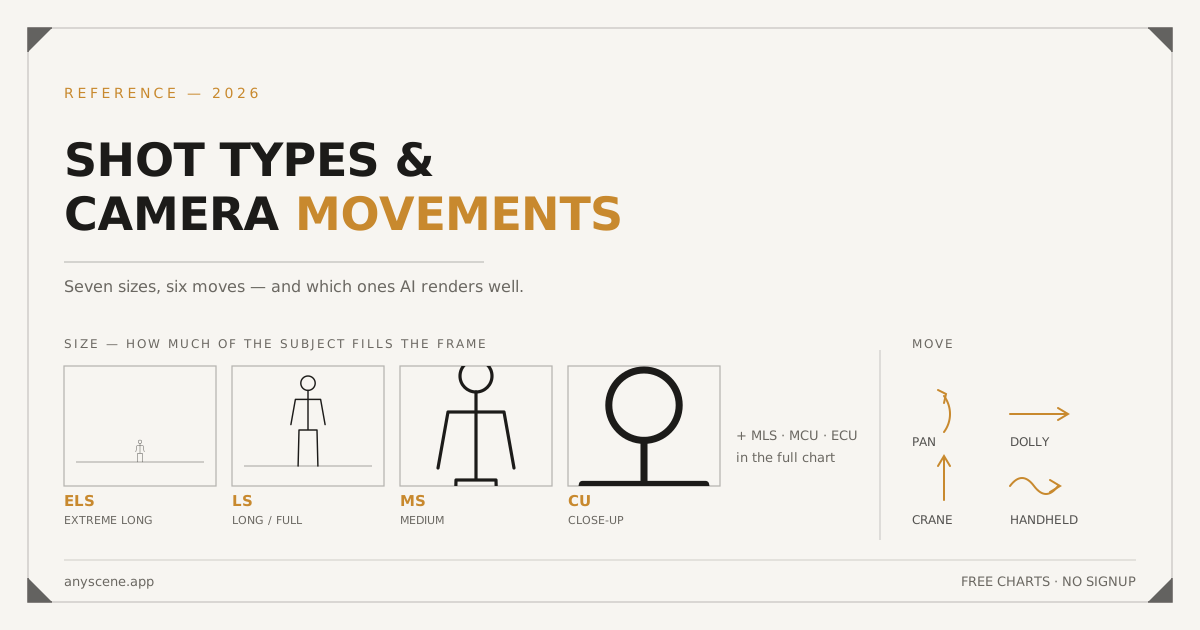
There are seven shot sizes and six camera movements. That's the whole vocabulary.
Everything else — the angles, the lens choices, the rigs — is a variation on those thirteen words. Learn them and you can write a shot list, direct a camera operator, or prompt an AI video model without guessing.
This page is the reference. Two printable charts at the bottom, free, no email.
We run Anyscene, so there's one section here you won't find on a film-school site: which of these moves current AI video models actually render, and which ones still break.
The Two Vocabularies
Shot size describes how much of the subject fills the frame. Camera movement describes what the camera physically does.
They're independent. A close-up can be static or dollying. A long shot can pan or sit still.
Why people confuse them
Because both get written into the same line on a shot list, and because one word — zoom — sits in neither category and gets used as if it belonged to both.
Zoom is neither
A zoom changes the lens's focal length. Nothing moves.
A dolly moves the camera through space. They look completely different: a dolly changes the relationship between foreground and background, a zoom flattens everything at once.
How to write both into one line
Size first, then subject and action, then the move.
Medium close-up, chest up. She turns toward the window. Slow dolly in.
That order isn't arbitrary. Size is the most load-bearing token, so it goes where it can't be missed.
The Seven Shot Sizes
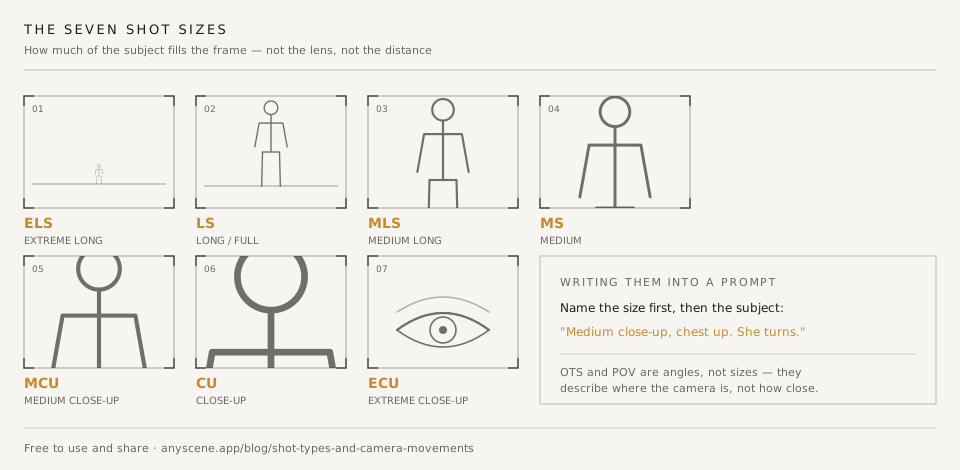
Sizes are named for how much of a person fills the frame. For objects, scale the same logic to the object.
Extreme long shot (ELS)
The subject is a detail in a much larger space. Landscape, skyline, a figure crossing a field.
Use it to establish where you are, or to make someone look small.
AI note
Reliable. Models handle ELS well because the subject carries little detail — there's less to get wrong.
Long shot (LS)
Full body, head to feet, with visible space around them. Also called a full shot.
The workhorse for showing what someone is physically doing.
AI note
Reliable, with one catch: hands and feet at this size are small enough that errors hide, which is convenient.
Medium long shot (MLS)
Knees up. Sometimes called a cowboy shot, from Westerns framing to include the holster.
Between "what they're doing" and "what they're feeling."
AI note
Solid. Watch for hands entering the frame at the bottom edge.
Medium shot (MS)
Waist up. The default for dialogue and for most product-in-use shots.
If you don't specify a size, this is roughly what you'll get.
AI note
The most reliable size across every model we've used. Also the most boring if it's your only size.
Medium close-up (MCU)
Chest up. The standard interview and presenter framing.
Close enough to read expression, wide enough to see gesture.
AI note
Reliable. Hands often clip the lower edge — either frame them in deliberately or crop above them.
Close-up (CU)
Head and shoulders. Fills the frame with a face or a single object.
This is where emotion lives. Use it sparingly so it keeps its weight.
AI note
Good, but this is where face artefacts start showing. Generate two and pick.
Extreme close-up (ECU)
A part of a face or object: eyes, hands, a switch, a texture.
Abstract and disorienting on purpose. Great for transitions.
Over-the-shoulder and POV are angles, not sizes
An over-the-shoulder shot describes where the camera is, not how close. It's usually an MCU or MS with a foreground shoulder in it.
Same with POV. Specify both when you need to: "Over-the-shoulder medium close-up, past his shoulder onto her face."
The Six Camera Movements
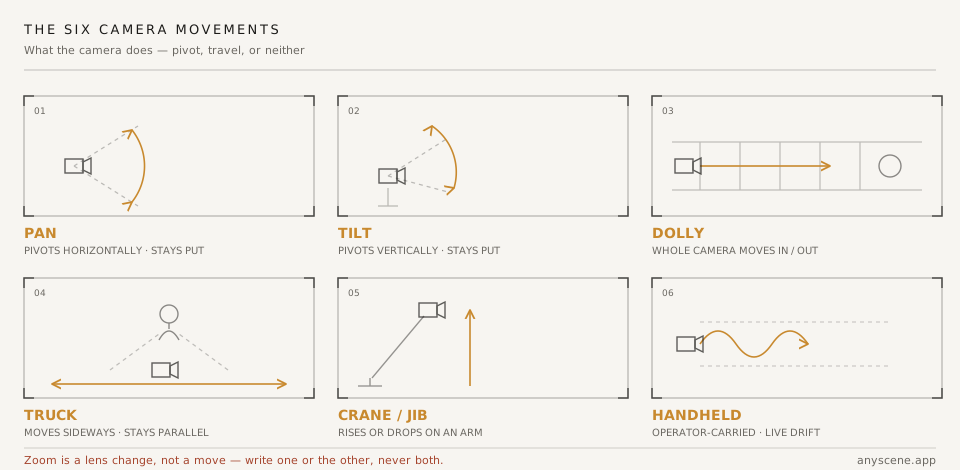
Three of these pivot the camera in place. Three move it through space. Knowing which is which is most of the battle.
Pan
The camera pivots horizontally on a fixed point. The tripod doesn't move.
Use it to follow action across a space, or to reveal something by turning toward it.
What a pan means
A pan says "look over here." It connects two things in one continuous take, which is a different statement than cutting between them.
Tilt
The camera pivots vertically. Same fixed point.
Tilting up a building makes it tall. Tilting down from a face to their hands makes the hands matter.
What a tilt means
Tilts assign significance. The thing you land on is the thing the audience reads as important.
Dolly
The entire camera moves toward or away from the subject, usually on a track or a wheeled rig.
This is the one people mean when they say "zoom in," and it's not the same thing.
Dolly vs zoom, and why a model cares
A dolly changes the spatial relationship between foreground and background — things get closer at different rates. A zoom crops in on everything uniformly.
Write "dolly in" and a model generates parallax. Write both "dolly" and "zoom" and it tries to do both, which is why those clips come out feeling wrong without an obvious reason.
Truck
The camera moves sideways, staying parallel to the subject. Also called a crab.
Trucking alongside a walking character keeps them the same size while the background slides past.
Truck vs pan
A pan pivots and the background swings. A truck travels and the background slides. They read completely differently, and swapping them is the most common shot-list error.
Crane / jib
The camera rises or drops on an arm.
Cranes make endings feel like endings. Rising away from a character is the visual grammar of leaving.
AI note
The least reliable move on this list. Complex crane paths tend to warp geometry.
Handheld
The operator carries the camera. Deliberate instability.
Handheld reads as urgency, documentary, or subjective presence. It's a tone choice, not a movement choice.
AI note
Models do a decent approximation of handheld drift, but they overdo it. Ask for "slight handheld drift," not "handheld."
Which Moves AI Video Actually Renders Well
This is the section film-school references don't have, and it's the reason this page exists rather than just the charts.
Verdicts below are from our own generation work across the models in the Anyscene lineup. They're qualitative, not benchmarked — treat them as a starting point, not a spec sheet.
| Move | Renders reliably | What breaks |
|---|---|---|
| Static | Yes | Nothing — this is the safe default |
| Pan | Yes | Fast pans can smear the background |
| Tilt | Mostly | Long tilts drift off the subject |
| Dolly in | Yes | The strongest move to ask for |
| Dolly out | Mostly | Backgrounds get invented as they enter frame |
| Truck | Mixed | Often collapses into a pan |
| Crane | Rarely | Geometry warps on complex paths |
| Handheld | Yes | Overdone unless you say "slight" |
What holds up today
Static and dolly in. If you want a move that will land on the first generation, those are the two.
Pans work well when the subject stays roughly centred. Slight handheld is dependable and adds a lot of life for one word.
What still breaks
Complex crane moves
A crane that rises and rotates and pushes in is three instructions describing one continuous path. Models tend to pick one and warp the rest.
Break it into two shots instead.
Long handheld takes
Drift compounds. What starts as texture becomes seasickness by the end of an eight-second clip.
Keep handheld shots short, or ask for "locked off with slight handheld texture."
How to phrase a move so it survives
One move per shot. Name it with the standard word, not a description of the effect.
"Slow dolly in" survives. "Camera pushes forward while gently zooming to create intimacy" does not — it's three competing instructions and an intention the model can't act on.
More on that in our shot prompt library, which has forty examples using this vocabulary.
Camera Angles: The Modifier You Also Need
Size says how close. Movement says what the camera does. Angle says where the camera is vertically, and it changes the meaning of both.
An angle isn't a third thing you pick instead — it modifies a size. "Low-angle medium shot" is one instruction.
Eye level
Camera at the subject's eye height. Neutral, and neutral is a choice.
Most dialogue coverage sits here because it makes the audience a peer rather than an observer.
AI note
The default. If you don't specify an angle, this is what you get.
High angle
Camera above, looking down. The subject reads as smaller, younger, or more vulnerable.
Useful for showing a workspace or a layout — a high-angle medium shot of a desk shows what's on it.
Watch the cliché
High angle reads as "weak" so reliably that it becomes heavy-handed fast. One per scene, at most.
Low angle
Camera below, looking up. The subject gains height and authority.
Also good for architecture and for making a product feel monumental.
AI note
Works well, but low angles on faces exaggerate the jaw and nostrils. Frame from the chest down or keep the angle shallow.
Dutch angle
The camera rolls so the horizon tilts. Unease, disorientation, something wrong.
Ten to fifteen degrees is enough. More reads as a mistake or a music video.
AI note
Models handle a mild dutch fine. They frequently ignore an angle described in degrees, so say "slightly tilted horizon" rather than "12-degree dutch."
Bird's eye and worm's eye
The extremes: straight down, and straight up from ground level.
Both are strong enough that they announce themselves. Use them when the announcement is the point — an overhead of a table setting, a worm's eye of a building.
Overhead is the exception to the cliché rule
Flat overhead shots are the standard framing for tutorials, recipes, and product flat-lays, where they carry no dramatic weight at all. Context decides.
Writing All Three Into One Line
Angle, size, subject, action, light, move. Not every line needs all six.
Low-angle medium shot. He looks up at the sign. Overcast, flat light. Static.
The order that reads fastest
Put the framing words first so anyone scanning a shot list sees the setup before the story. Camera crews read left to right and stop reading once they know how to point the camera.
What to leave out
If it's eye level and static, say neither. Naming defaults adds noise and, in an AI prompt, spends tokens on instructions that change nothing.
The one you should never leave out
Size. It's the only field where the default actively hurts you.
Continuity Rules That Use This Vocabulary
The words above aren't just labels. Three editing rules depend on them.
The 180-degree rule
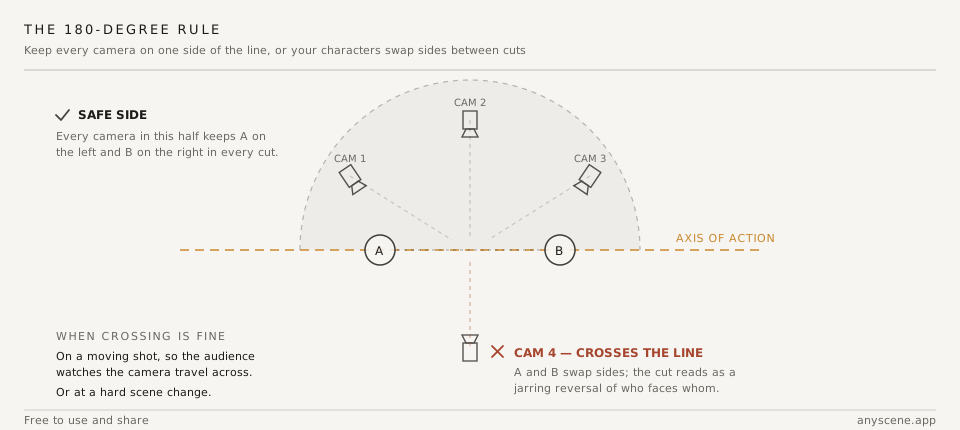
Draw an imaginary line between your two subjects. Keep every camera on one side of it.
Cross the line and your characters swap sides between cuts, which reads as broken even to viewers who can't say why.
When you can cross it
Deliberately, on a moving shot, so the audience sees the camera travel across. Or at a hard scene change where there's nothing to be inconsistent with.
Matching eyelines
If she's looking camera-right at him, his shot should have him looking camera-left at her.
Get this wrong and two people in the same room appear to be addressing furniture.
Cutting on size, not on subject
Two shots of the same subject at nearly the same size will jump-cut. The fix is to change size by at least two steps.
The 30-degree guideline
The traditional version says move the camera at least 30 degrees between shots of the same subject. A size change does the same job.
MS to CU cuts cleanly. MS to MCU jumps.
Free Charts, No Email Required
Both charts on this page are free to download, use, and republish. No signup, no watermark.
| Chart | What it covers | File |
|---|---|---|
| Shot sizes | All seven sizes with figure scale | SVG |
| Camera movements | All six moves with direction diagrams | SVG |
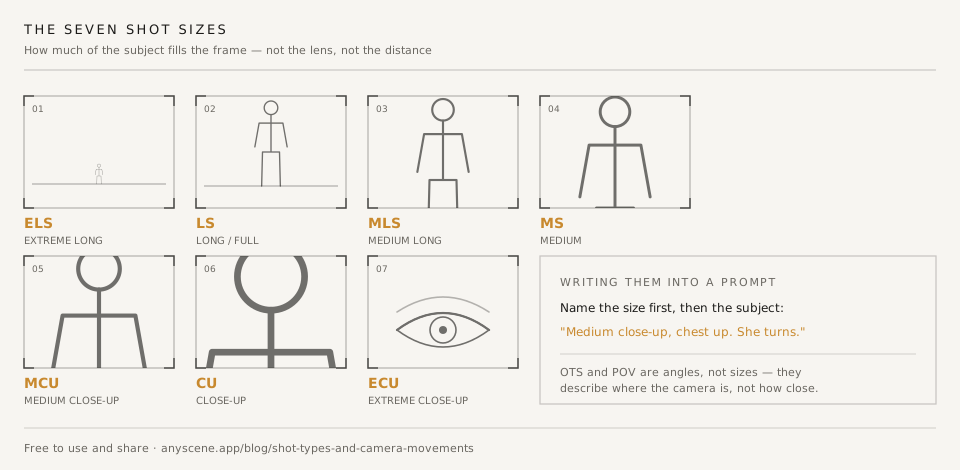
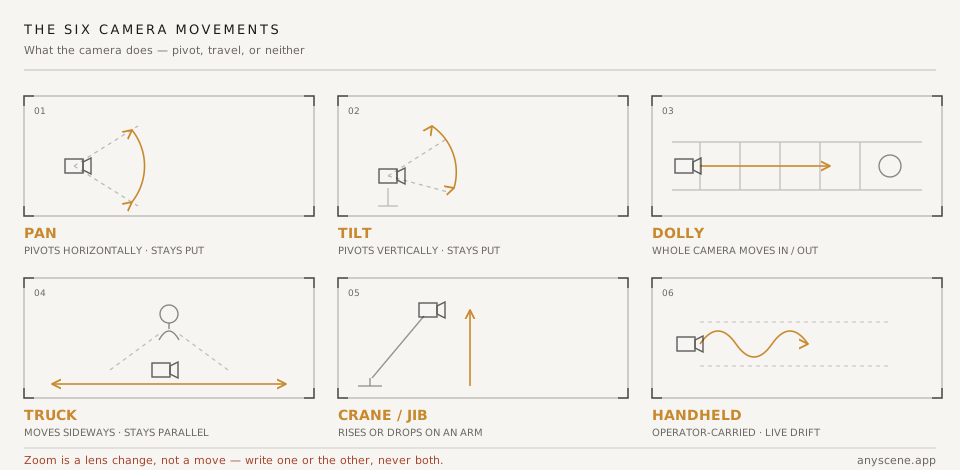
SVG scales to any size without going fuzzy — print them at A3 for a wall, or drop them into a call sheet.
If you republish them, a link back is appreciated but not required.
Frequently Asked Questions
How many shot types are there?
Seven standard sizes: extreme long shot, long shot, medium long shot, medium shot, medium close-up, close-up, and extreme close-up. Over-the-shoulder and POV are frequently listed alongside them but describe camera position rather than size, so they combine with a size rather than replacing one.
What is the difference between a pan and a truck?
A pan pivots the camera on a fixed point, so the background swings past. A truck moves the whole camera sideways, so the background slides. Following a walking subject with a pan keeps them centred but changes their size; trucking alongside keeps their size constant.
Is zoom a camera movement?
No. A zoom changes the lens's focal length while the camera stays still, so it flattens the image uniformly. A dolly physically moves the camera and changes the relationship between foreground and background. Writing both into one shot instruction is a common cause of strange-looking AI clips.
What is the 180-degree rule?
Keep every camera position on one side of an imaginary line drawn between two subjects. Cross it and the subjects swap screen sides between cuts, which reads as a continuity error. You can cross deliberately on a moving shot where the audience watches the camera travel across the line.
Which camera movements work best with AI video generators?
Static and dolly in are the most reliable across current models. Pan and slight handheld work well. Truck often collapses into a pan, and crane moves warp geometry on complex paths — split those into two shots instead of asking for one.
What shot size should I use for dialogue?
Medium shot or medium close-up for the main coverage, with over-the-shoulder shots for the exchange and a close-up saved for the line that matters. Using one size for all of it is what makes dialogue scenes feel flat.
Do I need to specify shot size in an AI prompt?
Yes — it is the single highest-impact token you can add. Without it, models default to roughly a medium shot every time, so every frame in your sequence ends up at the same distance. That uniformity is what makes generated sequences read as generated.
Put the Vocabulary to Work
Print the charts. Stick them somewhere you'll see them while writing a shot list.
Then write your next sequence with a size named on every line and a move named on maybe a third of them — and paste it into the AI storyboard generator to see the whole thing as frames before you commit to any of it.