
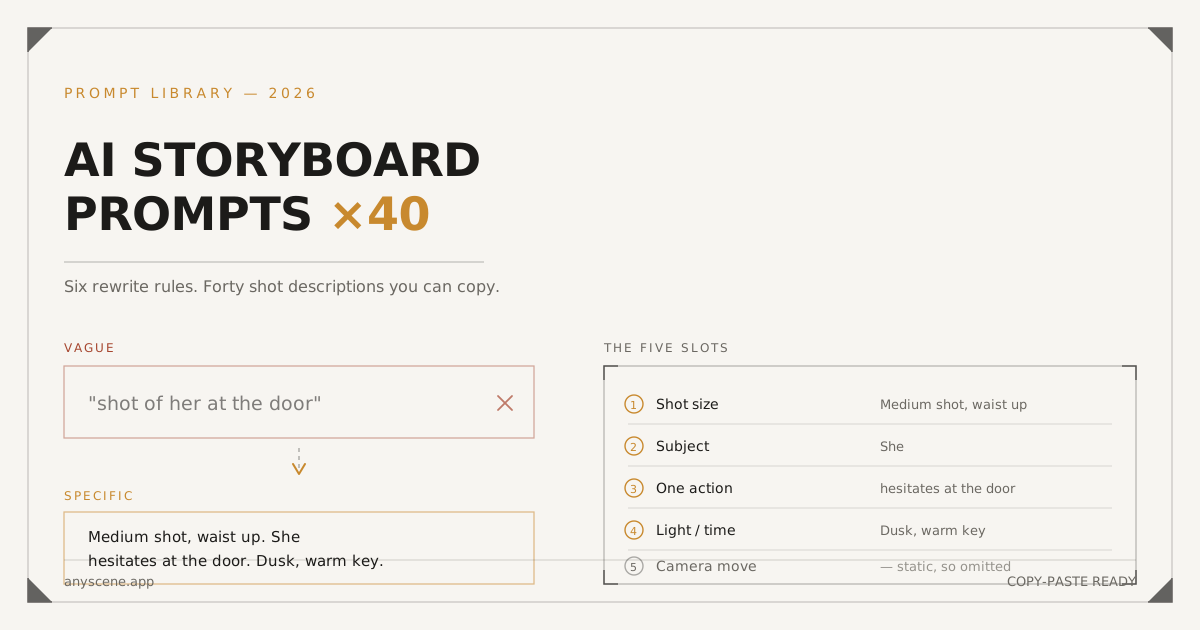
"Shot of her at the door" gets you a stock photo of a woman near a door.
"Medium shot, waist up. She hesitates at the door. Dusk, warm key" gets you a frame you can cut into a sequence.
Same scene. Same model. The difference is about fifteen words.
We run Anyscene, so we've watched a lot of credits disappear into prompts that were too vague to produce anything usable. Below are the six rules that fixed it, and forty shot prompts you can copy straight into a board.
Skim the rules if you're in a hurry. The prompt library starts about halfway down.
What Makes a Shot Prompt Work
A shot prompt is not an image prompt. An image prompt describes a picture. A shot prompt describes one continuous camera take that has to sit next to other takes and not fall apart.
That difference drives everything else here.
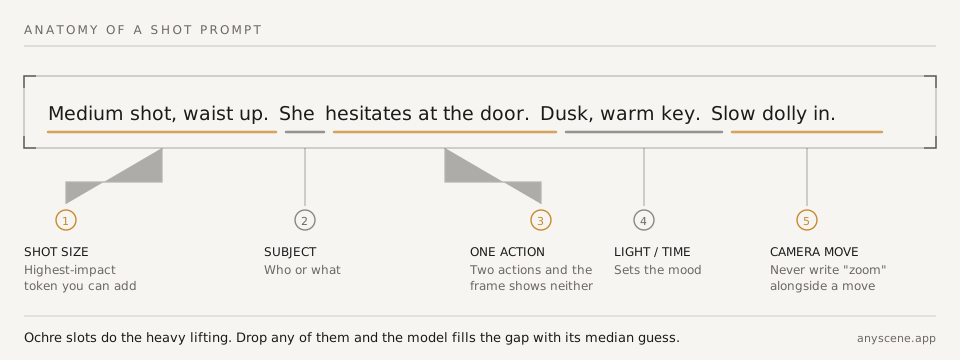
The five slots every shot prompt fills
Every prompt that works fills the same five slots. Leave one out and the model guesses.
| Slot | What it answers | Example |
|---|---|---|
| Shot size | How much of the subject fills the frame | Medium shot, waist up |
| Subject | Who or what | She |
| Action | One thing happening | hesitates at the door |
| Light / time | When, and how it's lit | Dusk, warm key |
| Camera move | What the camera does, if anything | Slow dolly in |
Three of those do most of the work: size, action, light. Subject is usually obvious from the script. Camera move is optional — plenty of good shots are static.
Why vague prompts return stock photos
The model has never seen your shot. It reconstructs one that matches your words.
When your words are thin, it fills the gap with whatever was most common in training. That's a centred, evenly-lit, mid-distance photograph — which is exactly what a stock library looks like.
One idea per prompt
The fastest way to get mush is to describe two things at once.
"She walks in and sits down while the barista looks up" is three actions and two subjects. You'll get a frame that shows none of them clearly.
The Six Rewrite Rules
Each rule below is one bad line, one good line, and what changed. These are the actual edits that moved our hit rate.
Rule 1 — Name the shot size
Shot size is the single highest-impact token you can add. It's also the one people leave out most.
Before and after
| Prompt | |
|---|---|
| ✗ | A shot of the chef in the kitchen |
| ✓ | Medium close-up, chest up. The chef tastes from a spoon. Overhead kitchen light, hard shadows |
Without a size, the model averages toward a mid-shot every time — which means every frame in your sequence looks like the same distance. That flatness is what makes AI boards read as AI.
💡 Pro tip: if you only remember one set of terms, learn the seven sizes — ELS, LS, MLS, MS, MCU, CU, ECU. They're the vocabulary every other rule here depends on, and the printable chart is here.
Rule 2 — One action, one shot
If your line contains "then," "while," or "as," it's probably two shots.
Before and after
| Prompt | |
|---|---|
| ✗ | He opens the letter and his face falls |
| ✓ | Shot A: Close-up on hands tearing a letter open. Shallow depth of field |
| ✓ | Shot B: Medium close-up, his face falling as he reads. Same window light |
Splitting cost you one extra shot. It bought you a cut, which is what makes a sequence feel edited rather than generated.
Rule 3 — Say the camera move, never the zoom
"Dolly in" moves the camera. "Zoom" changes the lens. They look completely different, and writing both makes models double-apply the effect.
Before and after
| Prompt | |
|---|---|
| ✗ | Slow zoom in on her face, camera pushes forward |
| ✓ | Slow dolly in to a medium close-up on her face. Handheld, slight drift |
Pick one word for the movement. Then stop describing it.
Rule 4 — Anchor the character before shot one
Generate or upload one reference image before you generate any shots. Every later frame inherits from it.
Before and after
| Approach | |
|---|---|
| ✗ | Describe "a woman in a red jacket" in all eight prompts and hope |
| ✓ | Lock one reference frame, then write prompts that say "the same woman" and let the reference carry the jacket |
Describing the character in words every time is the most common cause of drift. The description is never specific enough, and the model re-invents the details it wasn't given.
Rule 5 — Put light and time of day in words
Lighting is the cheapest way to make separate shots feel like one scene.
Before and after
| Prompt | |
|---|---|
| ✗ | Interior, coffee shop, two people talking |
| ✓ | Interior coffee shop, late afternoon, low sun through the window, warm rim light from camera left. Two people mid-conversation, medium two-shot |
Reuse that lighting clause across every shot in the scene. It does more for continuity than any style keyword.
Rule 6 — Leave transitions and text out
Don't ask for a fade, a title card, or music in a shot prompt. You'll get a frame with blurry letters baked into it.
Before and after
| Prompt | |
|---|---|
| ✗ | Product hero shot that fades into the logo with text "50% off" |
| ✓ | Close-up product hero on matte grey, single soft key from top left, shallow depth of field. Clean negative space top right |
Generate the clean frame. Add the text in your editor, where changing it costs nothing.
40 Prompts You Can Copy
Grouped by the job the shot is doing. Swap the subject and keep the structure.
Establishing and location
| # | Prompt |
|---|---|
| 1 | Extreme long shot, city skyline at blue hour, low horizon, lights just coming on. Static |
| 2 | Long shot, empty two-lane road through farmland, heat haze, midday sun overhead. Static |
| 3 | Extreme long shot, single figure crossing a wide snowfield, overcast flat light, high angle |
| 4 | Long shot, exterior of a small shopfront at night, neon sign the only warm source, wet pavement reflecting it |
| 5 | Wide shot, open-plan office interior seen from the doorway, cool daylight through full-height windows. Slow truck right |
How many establishing shots a scene needs
One. Occasionally two if you change location mid-scene.
Establishing shots are the ones people over-generate, because they're the easiest to describe. They're also the ones an editor cuts first.
Dialogue and two-handers
| # | Prompt |
|---|---|
| 6 | Medium two-shot, two people across a café table, late afternoon window light from camera left, both in frame at equal size. Static |
| 7 | Over-the-shoulder, past his shoulder onto her face listening, shallow depth of field, warm practical light behind her |
| 8 | Medium close-up, single, chest up, she answers, eyeline just off-lens to camera right. Same warm key |
| 9 | Close-up, his hands turning a coffee cup while he talks, table surface in focus, background fallen off |
| 10 | Medium shot, both standing, one steps back — hold on the gap between them. Static, slightly low angle |
Product and close detail
| # | Prompt |
|---|---|
| 11 | Close-up product hero on matte grey, single soft key from top left, shallow depth of field, clean negative space top right |
| 12 | Extreme close-up, texture of the fabric weave, raking side light to show the grain, macro |
| 13 | Medium close-up, hands unboxing, natural window light, soft shadow under the box |
| 14 | Close-up, product rotating slowly on a plain seamless background, even studio light. Slow 360 rotation |
| 15 | Medium shot, product in use on a kitchen counter, morning light, background softly out of focus |
📖 More on product framing in our ecommerce product photo guide.
Action and movement
| # | Prompt |
|---|---|
| 16 | Medium long shot, runner entering frame left and crossing, panning to follow, early morning backlight |
| 17 | Close-up, feet hitting wet pavement, low angle at ground level, spray catching the light. Static |
| 18 | Long shot, cyclist descending a switchback, high angle from across the valley. Slow pan following |
| 19 | Medium shot, someone pushing through a heavy door into daylight, silhouette against blown-out exterior |
| 20 | Medium close-up, hands working quickly at a workbench, overhead light, slight handheld drift |
Reaction and emotion
| # | Prompt |
|---|---|
| 21 | Close-up, face reacting, no dialogue, soft key from camera right, background dark and unlit |
| 22 | Extreme close-up, eyes only, catchlight from a window off-frame left. Static |
| 23 | Medium close-up, she hears something off-frame and turns toward it, warm interior light |
| 24 | Close-up, hands going still mid-task, the moment before a decision, table lamp as the only source |
| 25 | Medium shot, someone alone in a doorway, half in shadow, holding the frame a beat too long |
Transitions between scenes
| # | Prompt |
|---|---|
| 26 | Extreme close-up, steam rising from a cup, everything behind it out of focus. Static |
| 27 | Long shot, empty room after everyone has left, late light across the floor. Static |
| 28 | Close-up, a hand switching off a desk lamp, frame falling to near-dark |
| 29 | Extreme long shot, same location as the opening shot but at night. Static, matched framing |
| 30 | Medium shot, curtain or door closing across the lens, wiping the frame |
💡 Pro tip: shots 27 and 29 exist to give your editor somewhere to cut. Generate one per scene change even if the script doesn't ask for it.
Ad hooks and CTA frames
| # | Prompt |
|---|---|
| 31 | Medium close-up, direct-to-camera, someone starting to speak, bright even key, vertical 9:16 framing |
| 32 | Close-up, the problem happening — spill, tangle, error screen — harsh overhead light, slightly unflattering |
| 33 | Medium shot, product entering frame as the solution, light lifting as it enters |
| 34 | Close-up, before-and-after held side by side in one frame, even studio light, hard split down the centre |
| 35 | Medium shot, clean composition with deliberate empty space in the lower third for a CTA overlay. Static |
Why the CTA frame asks for empty space
Because the text goes on in the edit, not in the generation — Rule 6.
Ask the model to leave the lower third quiet and you get a frame your editor can drop a caption onto. Ask it for the caption and you get blurry letters you can't remove.
Explainer and diagram shots
| # | Prompt |
|---|---|
| 36 | Flat overhead shot, objects arranged on a plain surface, even shadowless light, generous spacing |
| 37 | Medium shot, hand pointing at something off-frame, clean background, no clutter |
| 38 | Close-up, single object isolated on white, no shadow, catalogue lighting |
| 39 | Medium long shot, presenter standing left of frame with empty space right for graphics. Static |
| 40 | Extreme close-up, detail of a mechanism, hard directional light to separate the parts |
Prompting for Consistency Across Shots
Prompts alone will not hold a character together. This is the part that trips people up.
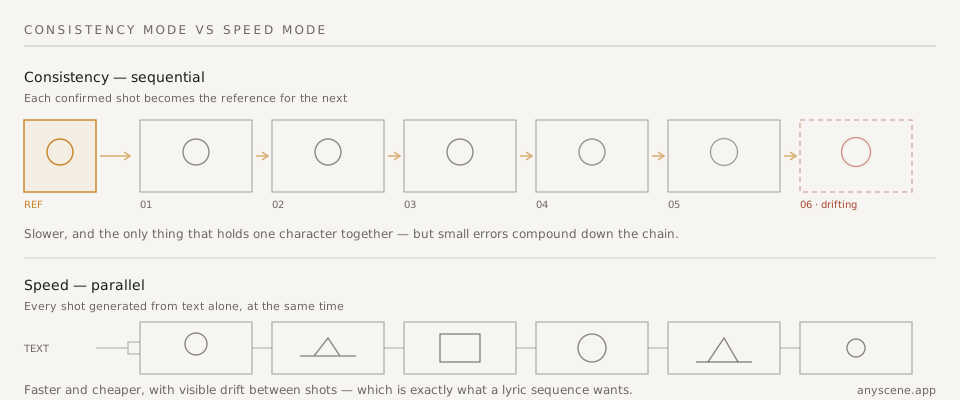
What a character reference actually locks
A reference image carries the things you'd never write out: the exact jaw, the specific shade of the jacket, where the hair parts.
Your prompt carries the things that change per shot: framing, action, light.
Try to do the reference's job in words and you'll get a different person every third frame.
Where consistency mode degrades
Sequential generation passes each confirmed shot forward as the reference for the next one. Small errors compound.
Re-anchoring past a dozen shots
Around a dozen shots, the drift becomes visible — the character has been photocopying itself. Go back to the original reference and re-anchor rather than continuing the chain.
When drift is what you want
Lyric sequences and montages are the exception. If every shot is a different world, sequential referencing is actively fighting you.
Use speed mode there and let the shots diverge.
Do Different Models Need Different Prompts?
Somewhat. Less than people assume.
What transfers between models
The five slots transfer completely. Shot size, one action, light, and a named camera move work on every model we've tested.
What doesn't transfer
Style keywords and lens specifics are where models diverge most. A phrase that produces cinematic grain on one model produces a literal film-grain overlay on another.
The safe move
Write the shot in plain language first. Add style keywords last, one at a time, so you can tell which one broke it.
Prompt Mistakes That Cost Credits
| Mistake | What you see | Fix |
|---|---|---|
| Stacking five style keywords | Muddy frame, none of the styles won | Pick one, add a second only if needed |
| Describing the edit | Split screens, fades baked into the image | Describe one frame only |
| Over-specifying the lens | Distorted faces, wrong framing | Give the shot size; add focal length only when it matters |
| Writing the whole scene | Everything small, nothing readable | One shot per prompt |
| No light direction | Flat, evenly-lit, generic | Name the source and the side it comes from |
Stacking styles until nothing wins
"Cinematic, moody, film noir, high contrast, anamorphic, 35mm, dramatic" is seven instructions competing for the same pixels.
The two-keyword limit
Two style keywords is usually where they start cancelling out.
Add them one at a time and regenerate. The moment a frame gets worse, you've found the one that doesn't belong.
Describing the edit, not the frame
A prompt describes a single moment. The second you write "then," "cuts to," or "transitions," you've left the frame.
Over-specifying the lens
Focal length matters for two things: compression on faces, and how much background you keep.
When focal length actually helps
Portraits at 85mm and wides at 24mm are worth saying. Everything between is noise the shot size already covered.
How to Test a Prompt Without Burning Credits
Test on shot one, not shot six.
Generate a single frame with the cheapest model in the lineup. If the framing and light are right, the prompt is right — switch models for quality and generate the rest.
If it's wrong at the cheap model, it will be wrong at the expensive one too, just more expensively.
The order that wastes the least
Framing first, then light, then style. Each one is cheaper to fix than the one after it.
Style keywords last, always — they're the only part that behaves differently between models, so locking them early means redoing the work when you switch.
Frequently Asked Questions
What is an AI storyboard prompt?
An AI storyboard prompt is a written description of one camera take — its shot size, subject, single action, lighting, and any camera movement — used to generate a single frame in a shot sequence. It differs from a general image prompt because the resulting frame has to cut together with the shots on either side of it.
How long should a shot prompt be?
Fifteen to thirty words covers the five slots without over-constraining the model. Shorter and it fills gaps with its median guess; much longer and instructions start competing. The prompts in the library above run 12–28 words.
Do I need to write prompts at all if the tool generates them?
No — a breakdown tool writes a first draft for every shot. But that draft is generic by design, and editing text is free while regenerating a frame is not. The AI storyboard generator leaves every prompt editable for exactly this reason.
Why does my character look different in every shot?
Because the prompt is doing the reference image's job. Words cannot specify a face precisely enough to reproduce it. Lock one reference frame first, then use consistency mode so each confirmed shot feeds the next.
Should I include camera movement in every prompt?
No. Static is a legitimate choice and often the right one for dialogue and product shots. Add a move when it does something — revealing information, following action, or building tension. A move in every shot reads as restless.
Can I reuse these prompts commercially?
Yes. They're shot descriptions, not code or copyrighted text — the same way "medium close-up, window light" has been written on shot lists for a century. Take them and change the subjects.
Take These and Break Them
Copy the forty. Change the subjects, keep the structure, and throw out any rule that stops helping.
The only one worth keeping under all conditions is the first: name the shot size. Everything else is negotiable.
When you've got prompts you like, paste a script into the AI storyboard generator and edit the breakdown it gives you — that's the cheapest place to apply everything above.
Then generate shot one, with the cheapest model, before you commit to the other five.
If the shot sizes in the library above need unpacking, the full reference is here — seven sizes, six moves, printable charts.